GRC tools for practitioners are hard to come by and unaffordable for anyone except companies with enterprise budgets. ServiceNow GRC is something I have explored and continue working with, but I wanted something free and open source that could support real assessment work without a license wall. After testing Eramba and OpenGRC I settled on CISO Assistant — maintained by intuitem, available under an open license on GitHub, and self-hosted via Docker. The community edition covers assessments, risk management, vendor risk, and report generation without a license fee, and the interface is polished enough that it does not feel like a compromise.
This post covers the full workflow: Docker setup, building and importing a custom CSF 2.0 framework with embedded interview questions, running a scoped Govern function assessment against a fictional healthcare client, populating the risk register from findings, and producing the executive summary that goes to leadership. The scenario is Cedar Ridge Medical Center — a 400-person HIPAA-covered health network in the Southeast, operating under private equity ownership with an 18 to 24 month acquisition exit timeline.
Installation
The install is straightforward if you are already running Docker. I cloned the community repository and adjusted the compose file for my environment — I run HAProxy as a reverse proxy with a local root CA, so I did not need their bundled Caddy proxy.
# Clone the repository
git clone --single-branch -b main \
  https://github.com/intuitem/ciso-assistant-community.git

cd ciso-assistant-community
The default docker-compose.yml includes a Caddy reverse proxy. I backed it up and wrote a minimal version scoped to my setup — backend, huey worker, frontend, and Qdrant for the vector search feature. The key environment variables to set correctly are CISO_ASSISTANT_URL (your public-facing URL) and PUBLIC_BACKEND_API_EXPOSED_URL on the frontend container.
# Backend and huey containers
ALLOWED_HOSTS=backend,localhost
CISO_ASSISTANT_URL=https://your-ciso-url.example.com
DJANGO_DEBUG=False
AUTH_TOKEN_TTL=7200

# Frontend container
PUBLIC_BACKEND_API_URL=http://backend:8000/api
PUBLIC_BACKEND_API_EXPOSED_URL=https://your-ciso-url.example.com/api
PROTOCOL_HEADER=x-forwarded-proto
HOST_HEADER=x-forwarded-host
The bootstrap script handles database initialization and first superuser creation. It also creates the db directory, so there is nothing to set up manually before running it.
./docker-compose.sh
docker compose up -d
The backend healthcheck runs for up to 150 seconds on first launch while Django runs migrations. The frontend container depends on the backend being healthy before it starts. If you see the frontend stuck in a restart loop, give it time or check backend logs with docker logs backend.
Building a Custom CSF 2.0 Framework
CISO Assistant ships with several frameworks available through its library including NIST CSF 2.0, SP 800-53, ISO 27001, and CIS Controls. But the default CSF 2.0 import contains the standard subcategory descriptions — not the interview questions an assessor actually uses during an engagement.
I built a custom framework that embeds practitioner interview questions directly into each subcategory as annotations. When you open GV.OC-01 in the assessment view the question is already there — you are not context-switching between a question bank and the tool on every control.
The framework is built as an Excel workbook following the CISO Assistant import schema, then converted to YAML using the convert_library_v2.py script in the tools directory. The conversion required a small fix for Python 3 syntax compatibility and the standard Python dependencies.
# Install dependencies
pip install openpyxl PyYAML lxml --break-system-packages

# Fix Python 3 exception syntax if needed
sed -i 's/except TypeError, ValueError:/except (TypeError, ValueError):/' \
  convert_library_v2.py

# Convert the framework
python3 convert_library_v2.py naxs_csf20_assessment_framework.xlsx
The conversion produces a YAML file. From there, the framework is imported manually through the CISO Assistant interface — navigate to Catalog, then Frameworks, and use the Import button to load the YAML file. Once imported it becomes a selectable framework when creating an audit. The custom framework Excel workbook and conversion notes are available on my GitLab.
For this engagement the framework covers the most commonly assessed subcategories rather than all 106. A full 106-subcategory assessment conducted properly spans multiple weeks and multiple stakeholder sessions. A focused assessment of one function, done thoroughly, produces better artifacts and better documentation for this demonstration.
Setting Up the Assessment
CISO Assistant organizes work around domains and perimeters. A domain is the client organization. A perimeter is the assessment scope within that organization. Both need to exist before you can create an audit.
Create the domain
Organization → Domains → New. Name: Cedar Ridge Medical Center. Status: Production. This is the client entity that all assessment work attaches to.
Create the perimeter
Inside the domain, create a perimeter scoping the engagement. For this assessment: CSF 2.0 Govern Assessment. This is the boundary for the current work — a full assessment would have a broader perimeter or separate perimeters per function.
Create the audit
Compliance → Audits → New. Select the custom NAXS Labs CSF 2.0 framework, attach the Cedar Ridge Medical Center perimeter. The audit loads all associated requirements with custom annotations embedded.
Filter to scope
Use the Filters option to narrow the view to the GV function. This keeps 17 subcategories in the working view and removes the remaining controls for this engagement.
Running the Assessment
Each subcategory opens with the control description at the top and the custom interview question in the Annotation field. Below that are two independent fields: Status (the audit task progress — To Do, In Progress, In Review, Done) and Result (the compliance verdict — Non Compliant, Partially Compliant, Compliant, Not Applicable). The Observation field captures auditor notes.
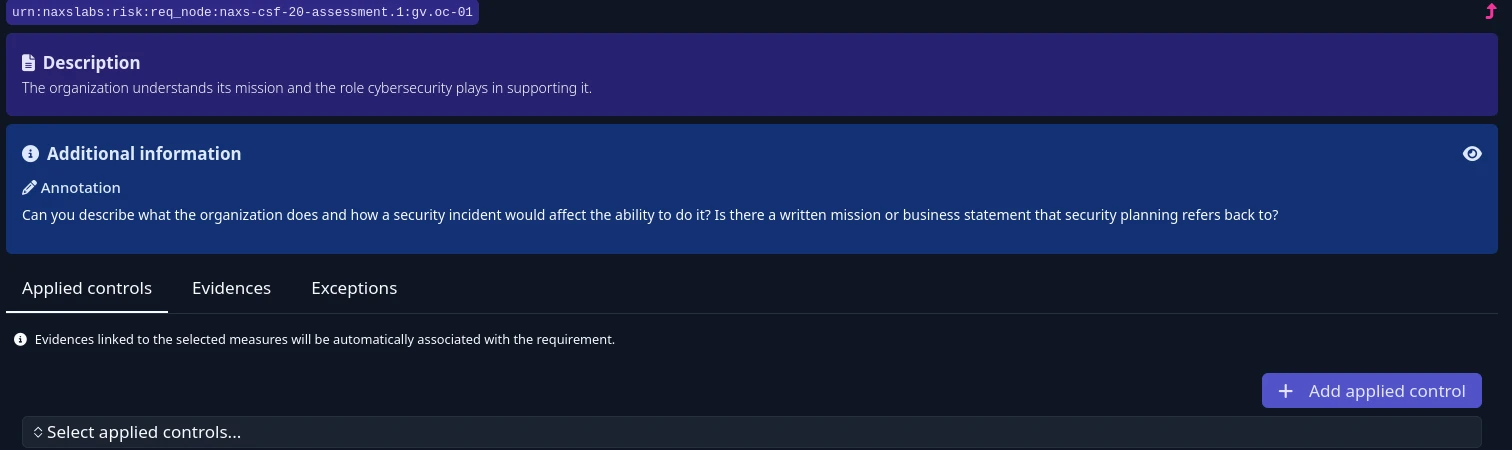
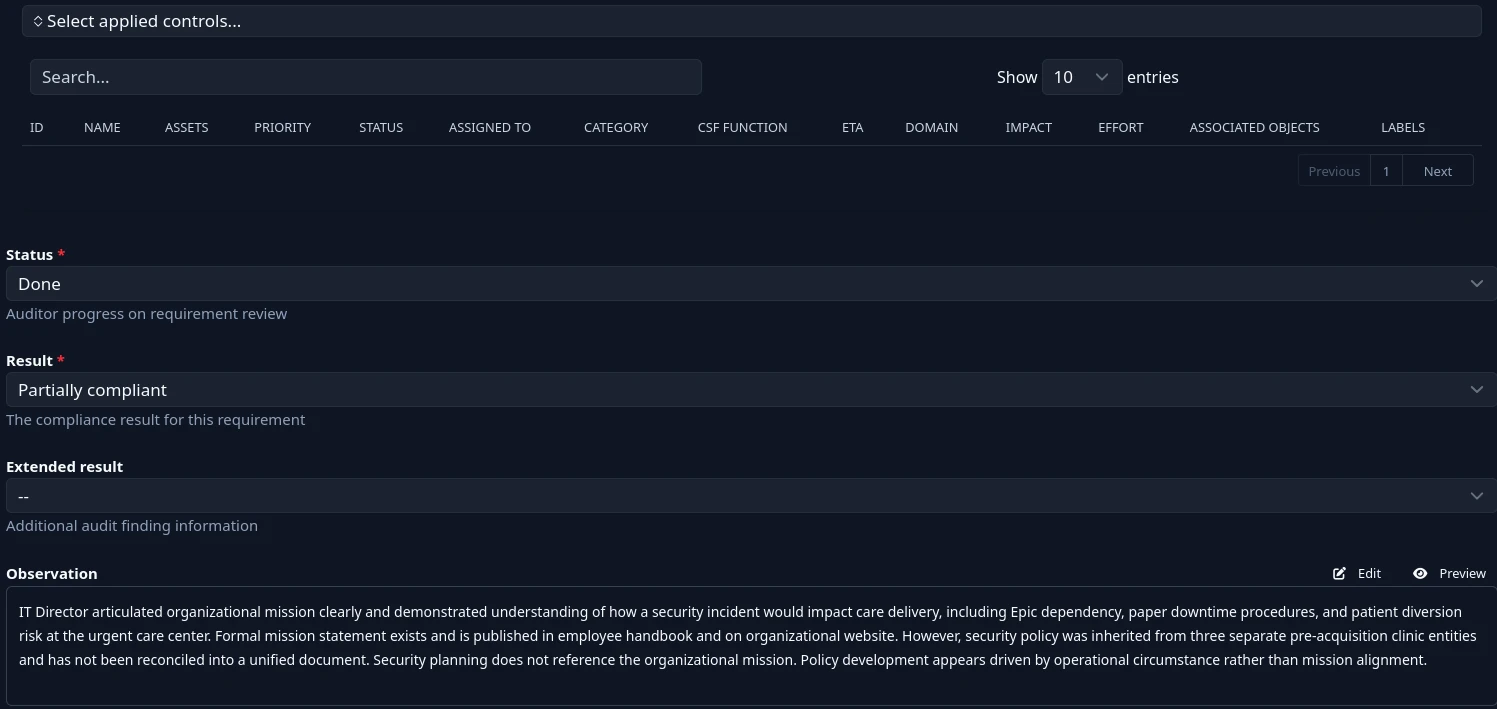
The workflow per subcategory is straightforward. Ask the question, document what you heard in the Observation field, set the Result based on what evidence exists versus what is missing, set Status to Done, and move to the next one. The annotation stays visible throughout so you never lose context on what you are assessing.
For Cedar Ridge’s Govern assessment the results were stark. Zero subcategories were fully compliant. Four were partially compliant — all in Organizational Context, where the IT Director demonstrated situational awareness even though formal documentation was absent. Thirteen were non-compliant, concentrated in Risk Management Strategy, Policies, and Oversight, where no formal program, no documented authority, and no structured review processes existed.
Several findings stood out beyond typical governance gaps. The organization had represented to its private equity acquirer during due diligence that a vulnerability management program existed — a characterization the IT Director acknowledged does not match current state. A vendor ransomware incident four months prior was handled with a single unverified phone call with no legal review of HIPAA breach notification obligations. MFA enforcement on Epic had been blocked by physician pushback for eight months with no resolution, leaving approximately 400 workforce members accessing PHI behind a password alone.
Building the Risk Register
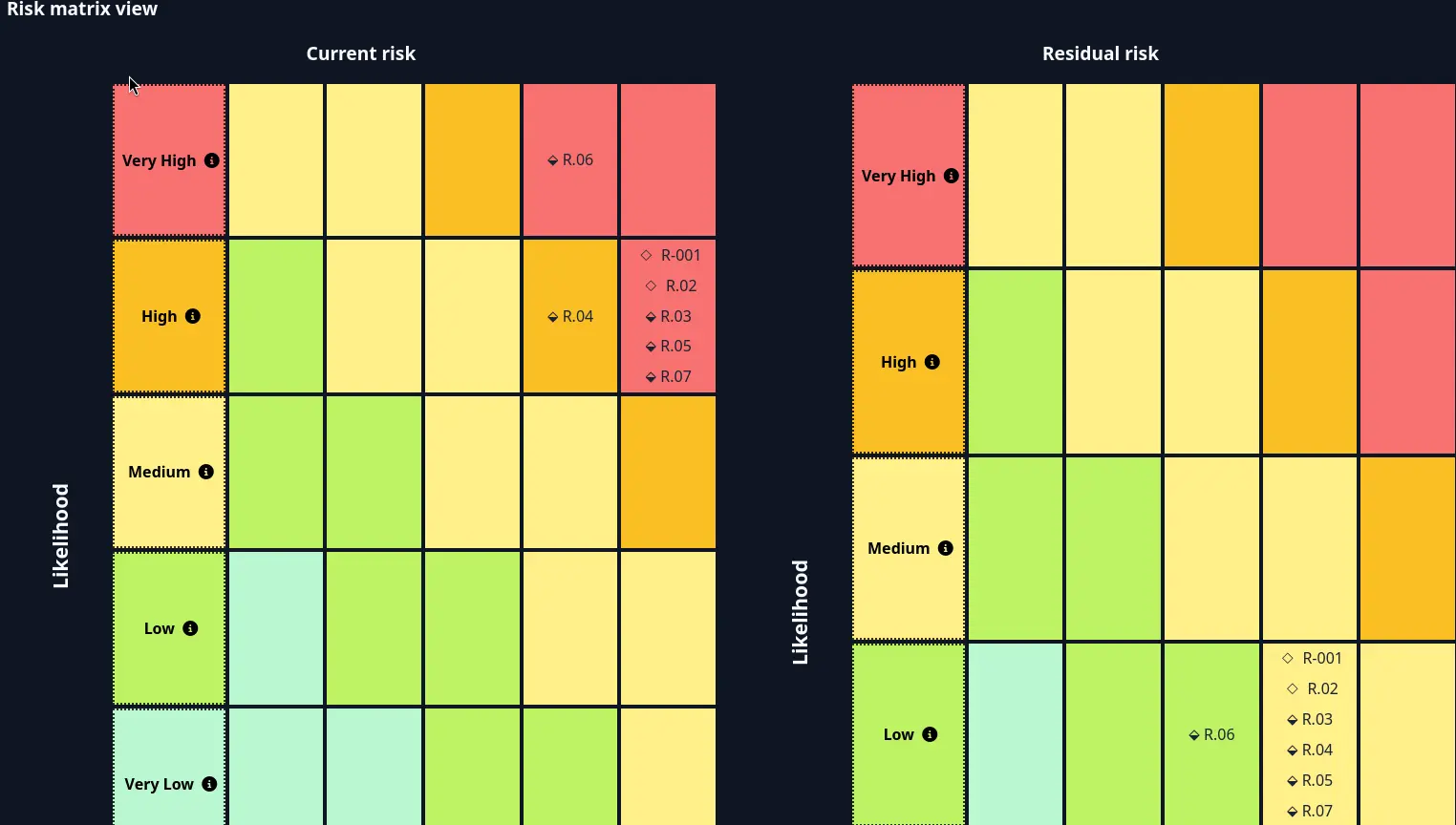
CISO Assistant’s Risk module uses ISO 27005 methodology with a configurable risk matrix. Before creating risk scenarios you need a risk matrix imported from the library. The intuitem Critical 5×5 matrix covers the standard likelihood and impact dimensions and populates the heat map view automatically once scenarios are scored.
Risk tolerance for a HIPAA covered entity operating under private equity ownership with an exit timeline should be set to Low — meaning anything scoring Medium or above requires a formal treatment plan. That threshold puts every Cedar Ridge risk above the acceptable line, which is accurate given the findings.
Before creating risk scenarios, import a risk matrix. Navigate to Catalog, then Frameworks, and click Import. In the import dialog, select the Risk Matrices tab to filter the library down to risk matrices only rather than seeing every available framework. Select the intuitem Critical 5×5 matrix and import it.
With the matrix imported, go to Risk, then Risk Assessments, and create a new assessment — attach it to the Cedar Ridge domain and perimeter, select the matrix, and set the risk acceptance threshold. For a HIPAA covered entity under private equity ownership, set tolerance to Low, meaning anything scoring Medium or above requires a formal treatment plan.
With the assessment created, click Add Risk Scenario for each finding. Each scenario requires a name, a description written as a formal risk statement (due to X, there is a risk that Y, resulting in Z), a risk origin, current probability, and current impact. The tool calculates the current risk level automatically and plots it on the heat map.
For residual risk, set the probability and impact you expect after planned controls are implemented. This gives you the side-by-side current versus residual view shown in the matrix screenshot. Assign an owner to each scenario — in a real engagement this would be the client stakeholder accountable for remediation, not the assessor.
Seven risk scenarios were built from the Govern assessment findings, each structured as a formal risk statement: due to X, there is a risk that Y, resulting in Z. Each scenario captures current probability, current impact, residual probability and impact after treatment, justification tied to specific assessment evidence, and strength of knowledge indicating how confident the scoring is based on available evidence.
The Audit Report
CISO Assistant generates an HTML audit report from the Compliance module under Reports. The output renders every assessed subcategory with its description, result, and observation — a complete technical record of the assessment that serves as the internal working document and evidence package.
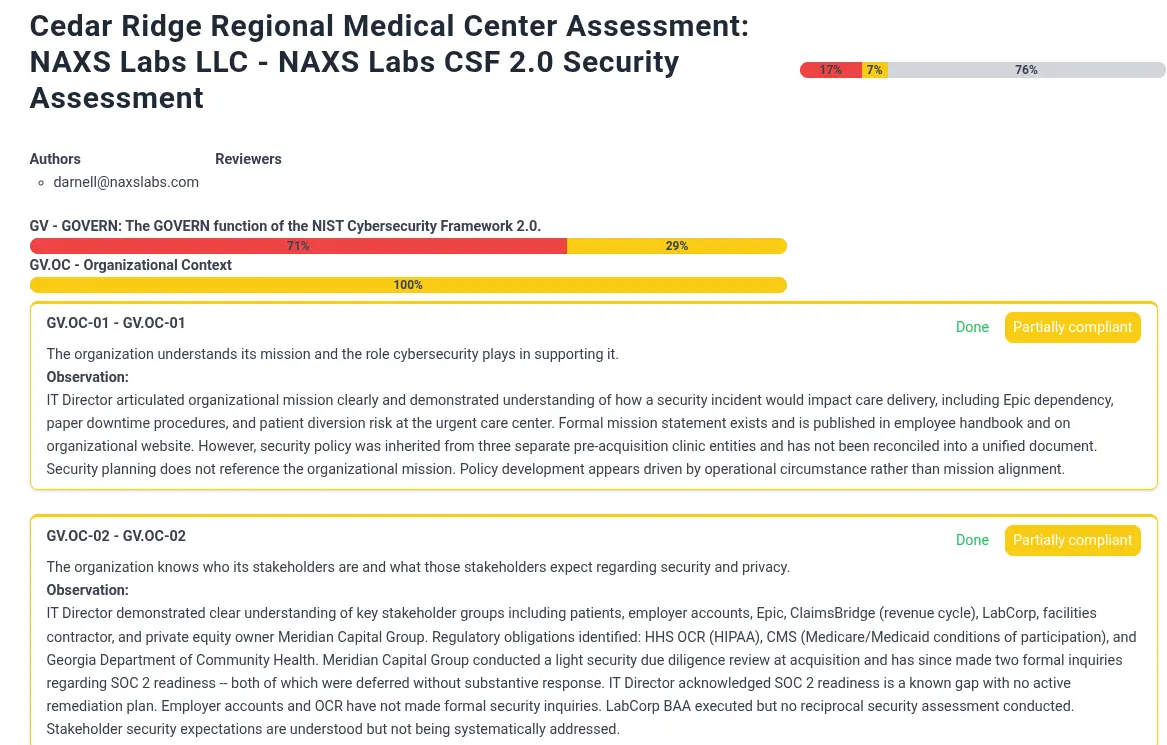
The report is not an executive summary. It is a control-by-control technical artifact appropriate for the GRC analyst, the security team, and a detailed audit review. A CFO or PE operating partner will not read it. That document needs to be written separately, in business language, with findings translated from control IDs into consequences.
Executive Summary
The executive summary translates technical findings into business language for a non-technical audience — in Cedar Ridge’s case, the CEO and Meridian Capital Group’s operating partner. Every finding is anchored to the acquisition exit timeline. A governance failure at a stable company is a compliance problem. At a company 18 months from exit due diligence, it is a valuation problem.
What This Workflow Produces
At the end of this engagement the artifact set is: a scoped CSF 2.0 assessment with 17 documented subcategories, auditor observations, and compliance results; a seven-scenario risk register with heat map scored against an ISO 27005 matrix with current and residual risk levels; an HTML audit report for internal review; and the executive summary above written for a non-technical leadership audience.
CISO Assistant is not a replacement for enterprise platforms like ServiceNow GRC. It does not have the workflow automation, ticketing integrations, or organizational scale those tools provide. What it does have is a clean interface, a real multi-framework data model, a functional risk module, and a framework import path that lets you bring your own assessment methodology. For a small consulting practice or a solo GRC practitioner, that is enough to do the job properly.