Building a High-Availability MariaDB Galera Cluster Across Multiple Sites
Eliminate single points of failure with active-active database clustering
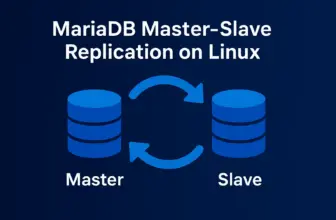
Traditional master-slave replication provides basic redundancy but leaves you vulnerable to single points of failure. When the master database fails, your applications go dark until you manually promote a slave. MariaDB Galera Cluster eliminates this weakness by creating a true active-active cluster where every node can handle reads and writes, ensuring continuous operation even during catastrophic failures.
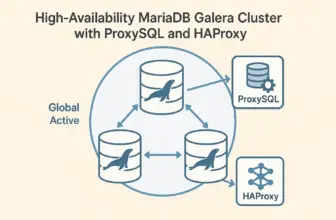
This implementation demonstrates deploying a geographically distributed Galera cluster across multiple data centers using ZeroTier for secure connectivity. While this setup tests the cluster’s resilience across different locations, Galera works equally well on a local network or within a single data center. The distributed approach showcases the technology’s capabilities for true disaster recovery scenarios.
Prerequisites
- Minimum 3 servers with MariaDB 10.1+ installed
- Network connectivity between all nodes (local network, ZeroTier, VPN, or direct internet)
- Root or sudo access on all systems
- Synchronized time across all nodes (NTP recommended)
- Understanding of clustering concepts and split-brain scenarios
Galera vs Master-Slave Architecture
Master-Slave Limitations
- Single master creates bottleneck
- Manual failover required
- Potential data loss during failures
- Slaves can lag behind master
Galera Advantages
- All nodes accept reads and writes
- Automatic failover and recovery
- Synchronous replication, no data loss
- No replication lag or conflicts
Step 1: Install MariaDB and Galera
Install the required packages on all cluster nodes:
# Update package repositories
sudo apt update

# Install MariaDB and Galera
sudo apt install mariadb-server galera-4

# Secure the installation
sudo mysql_secure_installation
Step 2: Configure Firewall (Critical)
Critical: Open Required Ports on ALL Nodes
Most Galera setup failures are caused by missing firewall rules. All cluster communication ports must be open on every node.
# IMPORTANT: Ensure SSH access is maintained
sudo ufw allow 22/tcp

# MariaDB client connections
sudo ufw allow 3306/tcp

# Galera cluster communication
sudo ufw allow 4567/tcp  # Group communication
sudo ufw allow 4567/udp  # Group communication (multicast)
sudo ufw allow 4568/tcp  # Incremental State Transfer (IST)
sudo ufw allow 4444/tcp  # State Snapshot Transfer (SST)

sudo ufw reload
Step 3: Configure Galera Cluster
Create the Galera configuration file on all nodes. The configuration is nearly identical across nodes, with only node-specific values changing:
sudo vim /etc/mysql/mariadb.conf.d/60-galera.cnfGalera Configuration Template
[mysqld]
# Basic MariaDB settings
binlog_format=ROW
default_storage_engine=InnoDB
innodb_autoinc_lock_mode=2
bind-address=0.0.0.0

# Galera Provider Configuration
wsrep_on=ON
wsrep_provider=/usr/lib/galera/libgalera_smm.so

# Galera Cluster Configuration
wsrep_cluster_name="production_cluster"
wsrep_cluster_address="gcomm://192.168.1.10,192.168.1.11,192.168.1.12"

# Node-specific (change for each node)
wsrep_node_name="node1"           # node1, node2, node3
wsrep_node_address="192.168.1.10"  # this node's IP address
Node 1 Configuration
wsrep_node_name="node1"
wsrep_node_address="192.168.1.10"
Node 2 Configuration
wsrep_node_name="node2"
wsrep_node_address="192.168.1.11"
Node 3 Configuration
wsrep_node_name="node3"
wsrep_node_address="192.168.1.12"
Step 4: Bootstrap the Cluster
Clean Start (if needed)
# Stop MariaDB on all nodes
sudo systemctl stop mariadb

# Remove old cluster state files on all nodes
sudo rm -f /var/lib/mysql/gvwstate.dat
sudo rm -f /var/lib/mysql/grastate.dat
sudo rm -f /var/lib/mysql/galera.cache
Bootstrap First Node
# On node 1 ONLY - create new cluster
sudo galera_new_cluster

# Verify bootstrap success
mysql -u root -p -e "SHOW STATUS LIKE 'wsrep_cluster_size';"
# Should return: 1
Critical Bootstrap Behavior
DO NOT restart the bootstrap node until other nodes have joined the cluster. The bootstrap mode prevents normal restarts and will cause the node to fail.
Join Additional Nodes
# On node 2
sudo systemctl start mariadb

# Verify cluster growth
mysql -u root -p -e "SHOW STATUS LIKE 'wsrep_cluster_size';"
# Should return: 2

# On node 3
sudo systemctl start mariadb

# Final verification
mysql -u root -p -e "SHOW STATUS LIKE 'wsrep_cluster_size';"
# Should return: 3
Step 5: Verify Cluster Operation
Check Cluster Health
# Check cluster status on any node
SHOW STATUS LIKE 'wsrep%';
Healthy Cluster Indicators
- wsrep_cluster_size: 3
- wsrep_ready: ON
- wsrep_connected: ON
- wsrep_local_state_comment: Synced
Test Active-Active Replication
# On node 1 - create test database
CREATE DATABASE cluster_test;
USE cluster_test;
CREATE TABLE users (
    id INT AUTO_INCREMENT PRIMARY KEY,
    name VARCHAR(50),
    created_at TIMESTAMP DEFAULT CURRENT_TIMESTAMP
);
INSERT INTO users (name) VALUES ('Alice');

# On node 2 - verify replication and add data
USE cluster_test;
SELECT * FROM users;  -- Should see data from node1
INSERT INTO users (name) VALUES ('Bob');

# On node 3 - verify all data present and add more
USE cluster_test;
SELECT * FROM users ORDER BY id;  -- Should see data from all nodes
INSERT INTO users (name) VALUES ('Charlie');
Operational Considerations
Normal Operations
- Any node can be restarted safely
- Automatic rejoin after restart
- No manual intervention needed
- Rolling updates supported
Failure Recovery
- 1 node down: Cluster continues
- 2 nodes down: Read-only mode
- All nodes down: Manual bootstrap needed
- IST/SST handles sync automatically
Split-Brain Protection
- Requires majority (2 of 3) for writes
- Network partitions handled gracefully
- Odd number of nodes required
- Automatic recovery when connectivity restored
Security and Performance Considerations
Network Security
In this implementation, database traffic between nodes is encrypted by ZeroTier’s mesh networking layer. This provides secure communication across public internet connections without additional configuration.
Additional Security Options
For environments requiring additional security layers:
- Configure Galera SSL/TLS for inter-node communication
- Enable MariaDB encryption at rest for database files
- Implement application-level encryption for sensitive data
- Use certificate-based authentication between nodes
Performance Optimization
# Add to Galera configuration for better performance
innodb_buffer_pool_size=1G         # Adjust based on available RAM
innodb_flush_log_at_trx_commit=0   # Better performance, slight risk
wsrep_slave_threads=4               # Parallel applying threads
What’s Next
With your Galera cluster operational, the next critical component is implementing a proxy layer for connection management and automatic failover. This eliminates the need for applications to handle multiple database connections and provides a single point of entry to your cluster.
In our next post, we’ll explore deploying ProxySQL to provide intelligent query routing, connection pooling, and seamless failover capabilities for your Galera cluster. This combination creates a truly resilient database infrastructure that can handle both planned maintenance and unexpected failures without application downtime.
Conclusion
MariaDB Galera Cluster transforms database infrastructure from a single point of failure into a resilient, distributed system. By eliminating the master-slave bottleneck and implementing synchronous replication, organizations gain true high availability without sacrificing data consistency.
Key Benefits Achieved
- Active-active clustering with all nodes accepting reads and writes
- Zero data loss through synchronous replication
- Automatic failure detection and recovery
- Geographic distribution for disaster recovery
- Horizontal scalability for both reads and writes
Security Note: In this implementation, we’ve leveraged ZeroTier’s mesh networking to encrypt database traffic between geographically distributed nodes. For additional security in production environments, consider adding SSL certificates for inter-node communication and implementing encryption at rest for database files.