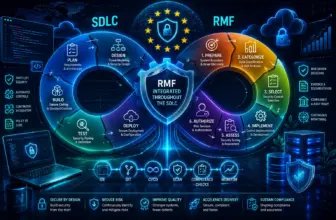
The Risk Management Framework is a structured process for authorizing federal information systems to operate. Each of its seven steps produces a specific artifact — a categorization document, a tailored control baseline, a System Security Plan — and each artifact becomes the input to the next step.
The scenario below is a simple one: an internal HR application that stores employee records — names, SSNs, salary information, performance reviews. Walking RMF through this system end to end makes the abstract steps concrete.
The Seven Steps
Prepare
Establish context before any control work begins. Define the system boundary — what’s in scope and what isn’t — identify stakeholders (HR owns the data, IT operates the system, leadership holds risk tolerance), and document what data types the system handles and how critical it is to the mission.
Output: System boundary & stakeholder documentationCategorize
Apply FIPS 199 to determine the system’s overall impact level — Low, Moderate, or High — based on the potential impact to Confidentiality, Integrity, and Availability if something went wrong. The HR system’s categorization is covered in detail below.
Output: System Categorization documentSelect
Based on the impact level from Categorize, pull the corresponding SP 800-53B control baseline — Low, Moderate, or High — and tailor it. Tailoring means adding overlays for specific requirements, removing controls that genuinely don’t apply, and documenting the rationale for every change.
Output: Tailored control baselineImplement
Engineers and operations teams build the controls — MFA, encryption, logging, access reviews. The GRC role here is documentation: capturing how each control is actually implemented in the System Security Plan. The SSP is largely a GRC-authored artifact even though the implementation work is technical.
Output: System Security Plan (SSP)Assess
An independent assessor tests whether the controls described in the SSP actually work as described — not just whether they exist on paper. The output is a Security Assessment Report. Where controls fail or are incomplete, those gaps get documented in a Plan of Action and Milestones (POA&M) rather than restarting the process.
Output: Security Assessment Report (SAR) + POA&MAuthorize
The Authorizing Official — not the ISSO, though the ISSO supports the package — reviews the SSP, SAR, and POA&M and makes a risk-based decision. The result is an Authorization to Operate, an Interim ATO if residual risk is acceptable short-term with a remediation timeline, or a denial.
Output: Authorization to Operate (ATO)Monitor
Continuous monitoring against the baseline — control effectiveness, configuration changes, incident activity, periodic reassessment. If something material changes — a new data type, an architecture change, integration with another system — that can trigger a return to Categorize or Select. It rarely means starting over from Prepare.
Output: Continuous monitoring programCategorize, in Detail — The High Water Mark Rule
Categorize is where most of the conceptual weight sits, and the high water mark rule is the part that’s easy to read about and harder to apply until you’ve done it once.
FIPS 199 requires rating the potential impact of a loss of Confidentiality, Integrity, and Availability — independently — for each data type the system handles. Each gets a rating of Low, Moderate, or High based on what would happen to the organization if that property were compromised.
For the HR system, there isn’t just one data type — there are several, each with a different risk profile:
| Data Type | Confidentiality | Integrity | Availability |
|---|---|---|---|
| Employee SSNs & banking info | High | High | Low |
| Performance reviews | Moderate | Moderate | Low |
| Employee directory (names, titles, extensions) | Low | Low | Low |
| Payroll processing data | Moderate | High | Moderate |
The high water mark rule says: the system’s overall category for each security objective (C, I, A) is the highest rating assigned to that objective across all data types it handles — and the system’s overall categorization is the highest of those three.
Looking at the table: Confidentiality’s highest rating is High (driven by SSNs and banking information). Integrity’s highest is also High — and notably, two separate data types drive it there independently. SSNs and banking details being altered has direct financial and legal consequences (incorrect tax reporting, redirected deposits), and payroll processing data being silently altered means people get paid the wrong amount. Either one alone would be enough to set Integrity to High. Availability tops out at Moderate.
This HR system categorizes as High overall — not because every piece of data it holds is highly sensitive, but because two different data types each independently push Integrity to High, and SSNs/banking push Confidentiality to High as well. The directory information being Low doesn’t pull the categorization down. Multiple paths can lead to the same ceiling, and one High anywhere in the system makes the whole system High for that objective.
This is the part that surprises people the first time: a system can feel “mostly low-risk” — most of what it does is unremarkable directory and review data — and still categorize as High overall because of one data type. The categorization isn’t an average. It’s a ceiling, set by the worst case.
Select — From Categorization to Control Baseline
Once the HR system is categorized as High, SP 800-53B provides the High baseline — roughly 325-425 controls depending on the revision, versus around 125 for Low and 325 for Moderate. This is a meaningfully larger control set, and it’s a direct consequence of the Categorize step — which is why getting Categorize right matters. Under-categorizing means under-controlling a system that actually needs more; over-categorizing means burning effort implementing controls that don’t match real risk.
Working with SP 800-53B in practice means two separate NIST documents: the control catalog (which describes every control and enhancement) and the baselines file (which maps each impact level to which controls from the catalog apply). Filtering the baselines file to the High column gives you the starting control list — which then gets tailored. Tailoring might mean adding an overlay for a specific regulatory requirement, or documenting that a control doesn’t apply because of how the system is architected (with a justification, not just an omission).
The Point
RMF is a decision-making process, not a checklist. Every step produces something — a categorization document, a tailored baseline, an SSP, a SAR, a POA&M, an ATO package. Those artifacts are how security decisions get made, communicated, and defended at the organizational level.